Console
The Console opens alongside the Montage when Gateway starts. It's a diagnostics window — most of the time you won't need to look at it, but it makes Gateway health visible at a glance and is the first place to look when something misbehaves.
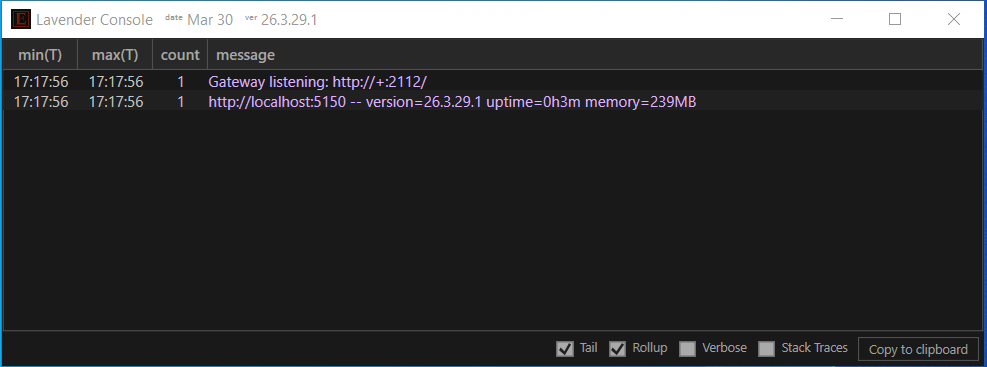
Event grid
Each row is one event. Entries are tinted by severity, so routine activity is muted and warnings and errors stand out.
Two display modes:
| Mode | Columns | Purpose |
|---|---|---|
| Flat (default) | time · message |
Every event in chronological order |
| Rollup | min(T) · max(T) · count · message |
Repeated messages are deduplicated, with first and last timestamps plus a count |
Toggle via the Rollup checkbox in the status bar. Click any column header to sort.
Status bar
All controls live in the status bar at the bottom of the window.
Logs (left side)
- Logs checkbox — when on, every visible event is written to a rolling daily log file.
- Folder path next to the checkbox — shows the current log directory. Click it to pick another. Defaults to
C:\Temp.
The path is always visible (so you can see where logs would go if you turned the checkbox on); it greys out while Logs is off.
Display and filter (right side)
| Control | Effect |
|---|---|
| Tail | Auto-scroll to the latest entry as new events arrive |
| Rollup | Group repeated messages with count and time range (switches grid columns) |
| Verbose | Include routine operational messages. On Gateway this surfaces incoming REST calls; on Terminal it surfaces detailed operational messages. Off by default. |
| Stack Traces | Show full exception stack traces inline. Off by default; turn on for debugging. |
| Copy to clipboard | Dump the visible events to the clipboard as text, with a header line identifying the session and version. Useful for sharing a snapshot with support. |
Persistence
Checkbox states and the log-directory selection persist across restarts via the ini file.
Relationship to the Montage
The Console and the Montage are two views onto one Gateway process — they always run together. Attempting to close either window opens the same exit dialog with three options:
- Restart — relaunch Gateway
- Shut Down — exit the process (both windows close, REST API stops)
- Cancel — keep Gateway running
Both windows can be minimized independently if you want them out of the way without shutting anything down. Individual close is not supported.