Montage
The Montage opens when you launch Gateway. It's the primary visual interface to the Greeks engine — a live chain viewer stacked vertically by expiration, with a dedicated Console diagnostics window that opens alongside.
A richer Montage will ship with Lavender Terminal.
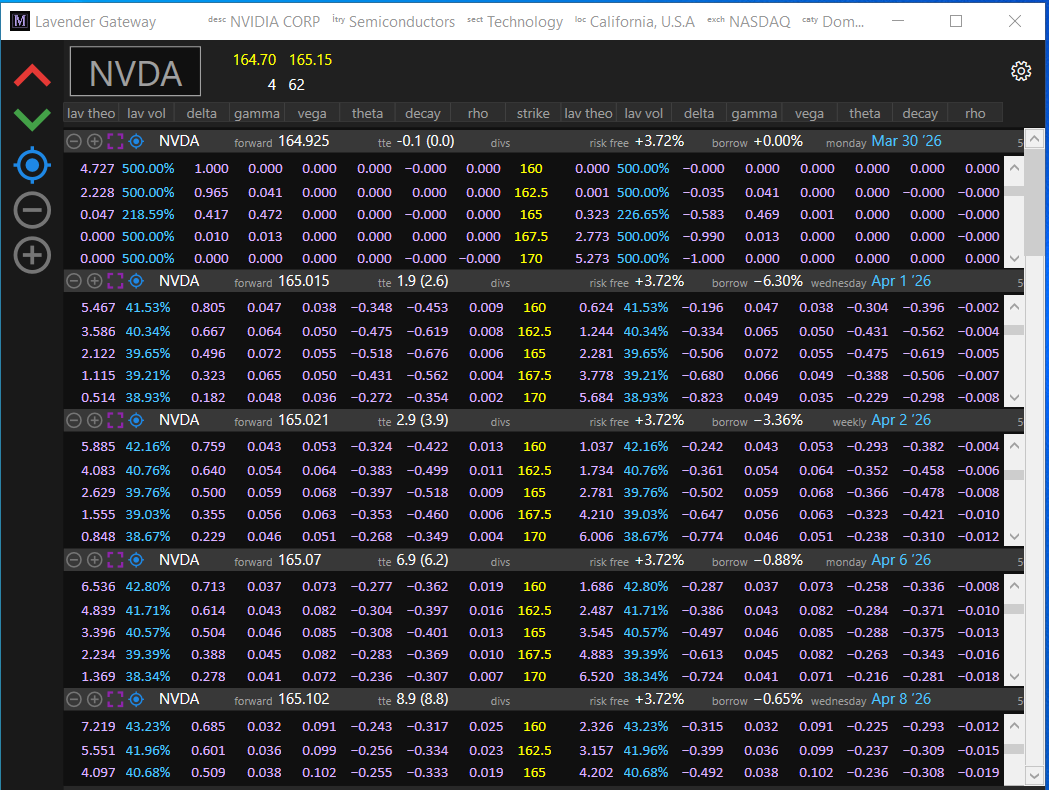
Layout
The window is divided into four regions:
- Ticker header (top) — current underlying symbol, compact bid/ask block, and a settings gear for layout and column configuration.
- Left sidebar (vertical toolbar) — global icon buttons that act on every chain at once.
- Chain stack (main area) — one row per expiration. Each row has a header; clicking it expands to reveal the strike grid.
- Footer — Console access and window controls.
Chain header
Every expiration displays its tenor metadata inline so you can scan skew and carry across dates without drilling in. The row shows, left to right:
- Forward price for the tenor
- Time to expiry — calendar days with variance days alongside (the two diverge around weekends and holidays)
- Dividends paid before expiry (cumulative)
- Risk-free rate (from the FRED yield curve)
- Borrow rate — implied from at-the-money put-call parity. Color-coded red/green in Terminal mode so hard-to-borrow names stand out.
- Expiry cycle label (weekly, monthly, quarterly, LEAP, …)
- 50-delta IV change from the prior session — the single most useful "what moved overnight" number
- 25-delta call · 50-delta call · 50-delta put · 25-delta put implied vols — instant read on skew and put-call spread
Clicking the header toggles expand/collapse for that chain.
Strike grid
When expanded, the classic option-montage layout: calls on the left, strikes in the middle, puts on the right, stacked by strike. Per contract, ticking live.
Shown by default:
- Bid IV, mid IV, ask IV, plus IV change from prior day
- Delta, gamma, vega, theta, decay, rho
- Vanna, volga
Available via the column picker:
- Theo price
- Charm, veta, speed, zomma, color, ultima, epsilon, vera
Not exposed in Gateway:
- Market-data fields — bid / ask prices, bid / ask sizes, mid, volume, open interest — appear grayed out in the column picker. These ship with Lavender Terminal.
All values come from the same Greeks engine that serves the REST API, so the montage and /l1/greeks always agree.
Per-chain controls
Each chain header carries four small icon buttons on the left edge:
| Icon | Action |
|---|---|
| − | Reduce visible strikes by one |
| + | Add a strike |
| ▣ | Maximize this chain |
| ⦿ | Center at-the-money |
Global controls (left sidebar)
The sidebar applies the same action to every chain simultaneously:
| Icon | Action |
|---|---|
| Collapse | Hide all strike grids, keep headers visible |
| Expand | Show all strike grids |
| Center | Center every chain at-the-money |
| − / + | Reduce or add visible strikes across all chains |
Navigation
- Type any letter A–Z at any time — opens the Ticker Picker filtered to tickers starting with that letter.
- Click the symbol in the top-left — opens the full Ticker Picker with no filter.
- Click a chain header — expand or collapse that chain.
- Settings gear (top-right) — column picker, feed mode, and other preferences.
Coverage
Every OPRA-listed underlying: approximately 6,000 equities, ETFs, and index options including SPX, NDX, RUT, VIX, and their weekly variants. Every listed expiration and strike.
Layout persistence
Column choices, window size and position, visible-strike depth per chain, and which chains are expanded all save to the ini file on exit and restore on next launch.
Console
See Console for the diagnostics window that opens alongside the Montage.