Running Gateway
Gateway is a long-lived program -- a single binary you run on your machine and leave running. This page covers the runtime flags, first-run setup, and the nightly housekeeping window.
Binary name
Examples on this page show the Windows form Gateway.exe. On macOS and Linux the binary is named Gateway (no .exe).
Command-line flags
Gateway accepts three optional flags. Both -name=value and /name=value forms work; the name match is case-insensitive.
| Flag | Default | Notes |
|---|---|---|
-id= |
prompted on first run | Email associated with your Lavender subscription. If omitted, Gateway prompts at startup; fails fast when stdin is redirected (services, containers, scheduled tasks). |
-port= |
2112 |
TCP port to listen on. |
-verbose= |
true |
When true, every successful REST call logs a one-line trace. Errors always log regardless. |
Unrecognized arguments cause Gateway to exit with a usage hint instead of silently ignoring them. If you pass -id me@example.com (space, not =) Gateway will refuse to start rather than drop the value and prompt again.
First-run setup
The first time you launch Gateway without -id=, you'll be prompted for the email associated with your subscription. Subsequent launches that pass -id=me@example.com skip the prompt.
Console output
After the boot splash, Gateway logs each REST call as it's served. Set -verbose=false to suppress the per-request log and keep only errors -- useful when Gateway is feeding a high-volume client and the trace becomes noise.
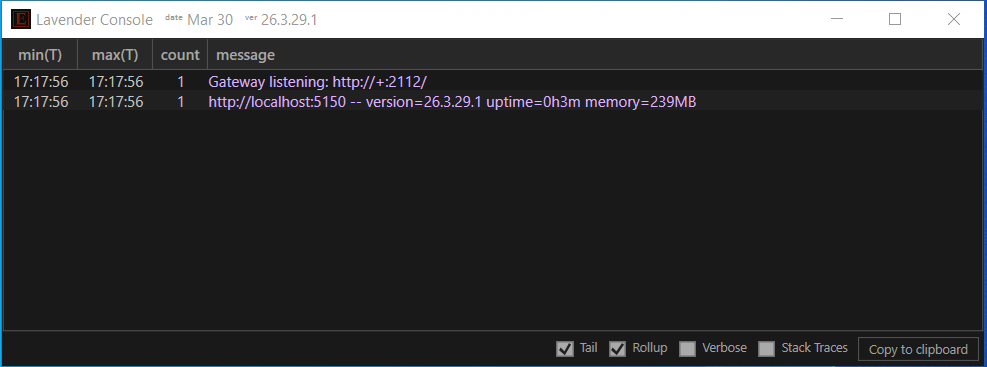
Logs
Gateway logs to stdout/stderr -- visible in the console window where you launched it -- and writes a rotating log file for long-term capture and investigation.
If you'd rather pipe stdout itself to a file (for example, to feed a log-collection tool watching the process output), redirect at launch:
Log levels
Gateway has two modes, controlled by -verbose=:
| Mode | Setting | What's logged |
|---|---|---|
| Verbose (default) | -verbose=true |
Every successful REST call as a one-line trace, plus all errors |
| Quiet | -verbose=false |
Errors only |
Use quiet mode when Gateway is feeding a high-volume client and the per-request trace becomes noise.
Network requirements
Gateway needs outbound HTTPS for subscription validation and runtime data. Gateway listens on port 2112 -- bound to all network interfaces by default (on Windows, with a fallback to localhost if global binding fails). Firewall the port if you'd prefer to restrict access to the local machine only.
Outbound hosts
Allow your firewall / egress rules to reach:
| Host | Port | Purpose |
|---|---|---|
prod-gateway.lavender-ts.com |
443 | Subscription validation and runtime data |
If your network requires an explicit egress allowlist, that single host is sufficient.
License and entitlement-check failure
Gateway revalidates your subscription periodically against prod-gateway.lavender-ts.com. Behavior on failure:
| Condition | Response |
|---|---|
| Network unreachable, transient | Gateway keeps serving cached data. |
| Entitlement revoked | Gateway logs the revocation and returns 502 on REST endpoints with a message indicating the entitlement issue. |
| Email mismatch on relaunch | Gateway exits with email not recognized and does not start the listener. |
| Outbound HTTPS blocked at first launch | Gateway can't validate the subscription on cold start and exits with a clear error. |
Renewing the subscription and restarting Gateway clears the state. "No data appearing" on a freshly-installed Gateway is almost always blocked outbound HTTPS.
Upgrades
Gateway upgrades automatically to the latest production release on every restart -- including the nightly housekeeping window (every morning, 03:00-04:00 ET). The exe / binary itself rarely changes (at most once a year); there is no "download the new binary" workflow to follow.
To pick up a fix immediately, stop Gateway (Ctrl-C in the console) and relaunch. Your subscription email and runtime flags are preserved across the restart.
For help, contact support@lavender-ts.com. Release notes and known-issue updates are posted on the marketing site.
Housekeeping window (nightly, 3:00-4:00 ET)
Gateway's normal restart and upgrade cadence is nightly, between 03:00 and 04:00 ET -- well outside US market hours by design. Outside that hour Gateway is not otherwise restarted.
During this window Gateway automatically upgrades to the latest production release -- no manual binary replacement required.
The restart is graceful: the HTTP listener stops accepting new connections, in-flight requests complete (typically tens to hundreds of milliseconds), Gateway exits, and the listener returns within seconds. Every flag you supplied on launch carries through -- including the email entered on first run -- so the relaunch is identical to the original session. Clients with retry logic reconnect transparently.
Detecting a restart
There is no explicit signal a restart happened. Any 5xx-class failure during 03:00-04:00 ET is overwhelmingly the nightly restart, and the next request after a brief retry will succeed.
Stopping Gateway
Press Ctrl-C in the console window — Gateway closes the listener cleanly and exits.